A Bingo 101 withdrawal takes your winnings out of the app and sends them to a bank account or a wallet in your own name. The minimum is ₹100, the maximum is ₹50,000, and most requests are processed within an hour once KYC is done. That is the short version. The longer version is about which part of your balance you can actually withdraw, because that is where nearly every delayed payout starts.
This guide covers the whole path from the Withdraw button to the bank credit: the limits, the two payout methods, the checks that run in between, how TDS changes the amount you receive, and what to do when money does not arrive. The figures come from the in-app screens and the platform’s Terms & Conditions, and they were last checked on 22 September 2026.
Bingo 101 Withdrawal at a Glance
If you only read one section, read this table. Each row is a rule that can stop or change a Bingo 101 withdrawal, and the right-hand column tells you where it comes from, so you know which ones to double check in the app before you press the button.
| Rule | What applies | Where it comes from |
|---|---|---|
| Minimum withdrawal | ₹100 | In-app withdrawal screen |
| Maximum withdrawal | ₹50,000 | In-app withdrawal screen |
| Payout methods | Bank account or UPAY wallet, added in Manage Payments | In-app |
| Whose account | Only an account in your own name | Terms, clause 11.2 |
| Before the first payout | KYC verified, PAN on file | Terms, clause 11.3 |
| Deposited money | Must be played through once (1x) | In-app rules |
| Bonus money | Locked until its own turnover is met (up to 5x) | Offer terms |
| Tax | 30% TDS on net winnings, taken before the credit | Indian income tax rules |
| Typical time | Usually minutes; within the hour after approval | In-app notice |
How to Withdraw from Bingo 101, Step by Step
The first Bingo 101 withdrawal takes longer than the rest because you set up your payout details and verify your identity once. After that, every withdrawal is a two minute job. Here is the full sequence as it runs in the app:
- 1Open the app, sign in, and tap Bank in the bottom menu. That is the wallet screen, headed Total Balance.
- 2Read the three boxes: Bonus, Cash and Withdrawable Balance. Only the third one can leave the app, and it is often lower than the total.
- 3Open Manage Payments and add where the money goes: Verify New Bank Account for a bank, or Verify UPAY Wallets Address for a wallet. Both go through a verify step, and the name has to be yours.
- 4Complete KYC if the app asks for it, including your PAN. Do this before your first big win rather than after.
- 5Back on the Bank screen, tap Withdraw Instantly under Withdrawable Balance, enter an amount between ₹100 and ₹50,000, and confirm.
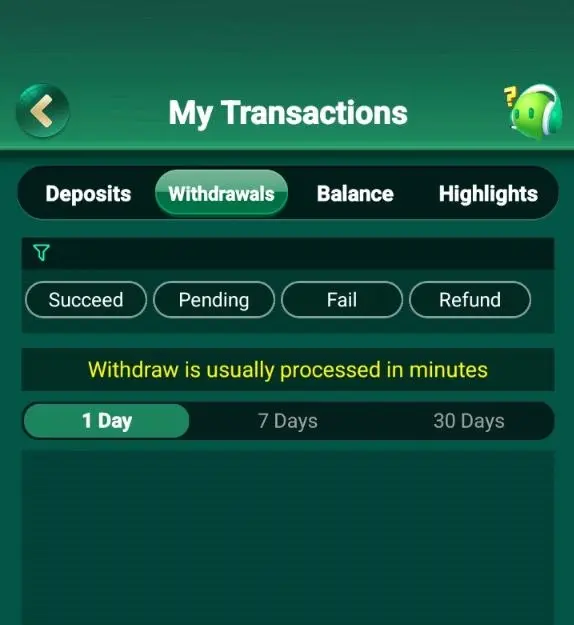
- 6Follow it in My Transactions, on the Withdrawals tab. Every request shows as Succeed, Pending, Fail or Refund, and you can look back 1, 7 or 30 days.
Adding a Bank Account or UPAY Wallet
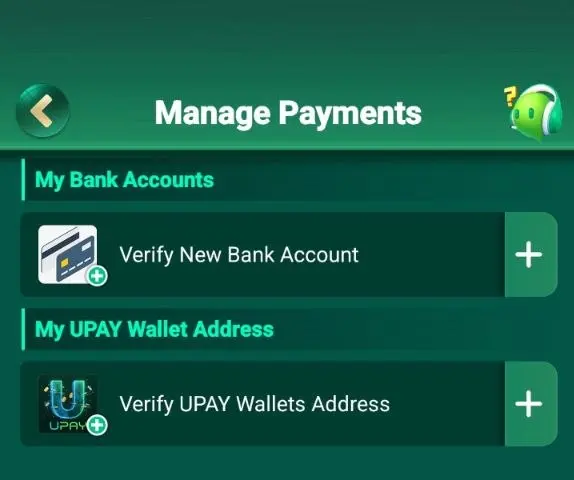
Both routes live under Manage Payments on the Bank screen: My Bank Accounts for a bank transfer, My UPAY Wallet Address for a wallet. Each is added through a verify step, so set yours up before there is money waiting on it. Whichever you pick, type it carefully. A wrong digit in an account number or a typo in a wallet address does not always fail straight away: sometimes the transfer bounces back hours later, and you are left waiting for a reversal that you could have avoided.
The Terms (section 11.2) are strict on one point: a Bingo 101 withdrawal is paid only to an Indian rupee account in your own name. A brother’s wallet or a friend’s bank account will be rejected, even if you are the one who added the cash.
Completing KYC and Adding Your PAN
KYC (know your customer) confirms that the person withdrawing is the person who owns the account. The app asks for identity details before the first payout, and PAN is required because tax has to be deducted against a PAN. Section 11.3 of the Terms says plainly that a missing PAN can delay a withdrawal or lead to winnings being held.
The practical advice is boring but it works: do KYC on the day you register. Players who leave it until they want to cash out are the ones who then wait for a review while their balance sits there.
Withdrawable vs Locked Balance: What You Can Cash Out
Open the Bank screen and the app answers this before you ask. Under Total Balance there are three boxes, Bonus, Cash and Withdrawable Balance, each with its own button, and only the third one carries Withdraw Instantly. That is why a total of ₹900 can pay out nothing, and the app says why in a line under the boxes: complete the bet requirement to enjoy unlimited withdraw.
- BonusPromotional credit, with a Collect button. It stays locked until that offer’s turnover is met, and the multiple is set per promotion, up to 5x. Unused bonus can expire.
- CashMoney you added, with the Add Cash button under it. It has to be played through once (1x) before it counts as withdrawable. Add ₹500, place ₹500 in bets, and that condition is met.
- Withdrawable BalanceWhat has already cleared its conditions. This box carries the Withdraw Instantly button, and it is the only figure a payout can come from.
Two examples make it concrete. The first add cash bonus is 10% up to ₹10,000 with a 1x requirement, so a ₹500 first deposit gives a ₹50 bonus that needs ₹50 of play before it becomes cash. The Weekly Card cashback also carries 1x, and it applies to the bonus only, not to the cash you paid for the card. The Bingo 101 bonus guide lists every offer with its multiple, and the weekly bonus guide covers the card in detail.
Bingo 101 Withdrawal Limits: Minimum, Maximum and Frequency
The minimum Bingo 101 withdrawal is ₹100. That floor is low on purpose: a small win or a converted bonus can be cashed out without having to build it up first. The minimum is a standard account rule, and none of the promotions raise it. The Weekly Card, for example, adds its own wagering condition to the bonus but leaves the ₹100 floor alone.
At the other end, the maximum Bingo 101 withdrawal is ₹50,000. Most players never come near it, but if you do, the app will not accept an amount above that figure. The app’s own terms also allow daily or per session limits at the platform’s discretion, so if a further request on the same day will not go through, that is the likely reason. Try again the next day.
One thing the app does not do is charge a published fee for withdrawing. What does come off the amount is tax, which the next section explains, and that is why the figure on your bank statement can be lower than the figure you typed in.
How Long a Bingo 101 Withdrawal Takes
The app puts its own answer on the transactions screen: withdraw is usually processed in minutes. In practice most requests land within the hour once KYC is verified, and payouts run around the clock. The time depends less on the amount than on which stage the request is sitting in, and there are three of them. Knowing which one you are in tells you whether to wait or to act.
| Stage | What happens | Usual time |
|---|---|---|
| Pending | The platform checks KYC, the name on the payout account, turnover and any unusual activity | Minutes; longer on a first withdrawal or a large amount |
| Succeed | The money has left the platform on the bank or wallet rail, with a reference number attached | Instant on UPI and IMPS rails |
| Fail or Refund | The transfer did not complete, so the amount is returned to your balance | Same day in most cases |
A wallet payout is normally the fastest route for a Bingo 101 withdrawal, because those rails settle in seconds, around the clock, weekends included. A bank transfer can move in batches instead, so it may land a little later the same day. A first withdrawal, a request close to the ₹50,000 cap, or a payout account you added recently can all send the request to a manual check, and that is what turns minutes into hours.
TDS on Your Bingo 101 Withdrawal
India taxes winnings from online games at 30%, deducted at source. The rule has applied since 1 April 2023, and it works on net winnings, not on the whole amount you withdraw. The platform deducts the tax before the credit, so the money that reaches your account is already after tax, and there is no threshold below which it switches off.
Net winnings are worked out across the financial year. In simple terms, it is what you withdraw minus what you have deposited during the year (plus any balance you started the year with). Bonus money is not your own deposit, so once it converts and is withdrawn, it counts as winnings.
| Example | Amount |
|---|---|
| Deposits this financial year | ₹2,000 |
| You ask to withdraw | ₹5,000 |
| Net winnings (₹5,000 minus ₹2,000) | ₹3,000 |
| TDS at 30% of ₹3,000 | ₹900 |
| Credited to your account | ₹4,100 |
The tax taken from each Bingo 101 withdrawal is reported against your PAN, and it can be claimed when you file your income tax return. For your own situation, check with a tax professional. This section is general information, dated to the rules in force in September 2026.
Why a Bingo 101 Withdrawal Is Pending or Rejected
When a Bingo 101 withdrawal fails, the cause is almost always on a short list, and nearly all of them can be fixed from your side. Find your situation in the table before you contact support. It is usually quicker.
| What you see | Likely cause | What to do |
|---|---|---|
| Withdrawable is lower than balance | Bonus turnover or the 1x on deposits not met | Check the offer’s progress; play the rest or wait for it to clear |
| Stuck on Pending | First withdrawal, KYC not finished, or a large amount | Finish KYC and PAN, then give it the rest of the day |
| Fail: name mismatch | The bank account or wallet is not in your name, or the spelling differs from KYC | Add one in your own name, spelled as on your ID |
| Fail: invalid details | Wrong wallet address, account number or IFSC | Re-add the method in Manage Payments and verify it again |
| Amount will not submit | Below ₹100, above ₹50,000, or a daily limit reached | Change the amount or try again the next day |
| Succeed but nothing in the bank | Bank delay or a bounced transfer | Check the reference number with your bank; if it bounced, send it to support |
| Account under restriction | Terms breach: multiple accounts, someone else’s payment method, or an ineligible location | Contact support; read the eligibility section of the Terms |
The last row deserves a word. Promotions are limited to one IP address and one device, and the Terms (section 8) say that players who are not eligible to play cash games can lose the right to winnings. Reading the eligibility section once, before you deposit, costs two minutes and removes the worst possible reason for a blocked withdrawal.
If Your Bingo 101 Withdrawal Does Not Arrive
Give a Bingo 101 withdrawal its normal window first, then work through these steps in order. Keep screenshots of the request and the transaction history, because support will ask for them.
- 1Open My Transactions and read the status on the Withdrawals tab. Pending means it is still being checked. Succeed means the money has left the platform. Fail or Refund means it came back to your balance.
- 2If it shows Succeed, ask your bank or wallet app to trace the reference number. Most missing credits turn up at this step.
- 3If the bank has no record, use Contact Us in the app: online customer service runs 24/7, and there is an email option. Send your UID, which is shown at the top of that screen, with the amount, the time and the reference number.
- 4For money you added that never reached your wallet, the Terms (section 9) allow a refund request through support, raised within 3 days of the payment. Approved refunds usually arrive within 5 business days.
Habits That Make Every Bingo 101 Withdrawal Faster
- Complete KYC and add your PAN on the day you register.
- Verify one bank account or wallet in your own name and keep using it.
- Check the withdrawable figure, not the total balance.
- Finish or skip an active bonus before you withdraw.
- Keep each amount between ₹100 and ₹50,000.
- Save the request ID and UTR of every payout.
It also helps to decide your Bingo 101 withdrawal point before you start playing, not in the middle of a session. Setting a limit and withdrawing when you reach it is the simplest way to keep real-money play under control. The Responsible Gaming page explains the limit tools, and the All India Gaming Federation publishes guidance for players in India. Bingo 101 is for players aged 18 and over.
For the wider picture of how the app works, from games to deposits, the complete Bingo 101 guide is the place to start.
Frequently Asked Questions
What is the minimum Bingo 101 withdrawal?
₹100, with a maximum of ₹50,000. Completed KYC is required before any withdrawal.
How long does a Bingo 101 withdrawal take?
The app says withdrawals are usually processed in minutes, and most land within the hour once KYC is verified. A first withdrawal, a large amount or a new payout account can add a manual review before the money is sent.
Which payment methods work for a Bingo 101 withdrawal?
A bank account or a UPAY wallet address, both added and verified under Manage Payments. They have to be in your own name, and third party accounts are rejected.
Can I withdraw bonus money straight away?
No. Bonus balance becomes withdrawable only after that offer’s turnover is met. The multiple is set per promotion, up to 5x.
Why is my withdrawable balance lower than my total balance?
Part of the balance is bonus still under turnover, or deposited cash that has not been played through once yet.
Is KYC required for a Bingo 101 withdrawal?
Yes. KYC and a PAN are needed before the first payout, and a missing PAN can delay or hold a withdrawal.
How much tax is deducted from a Bingo 101 withdrawal?
30% TDS on net winnings, which is what you withdraw minus what you deposited in the financial year. It is deducted before the money reaches you.
Is there a Bingo 101 withdrawal fee?
No fee is published. The difference between what you request and what arrives is normally the TDS.
My Bingo 101 withdrawal says success but the money is not in my bank. What now?
Ask your bank to trace the UTR number. If it bounced, send the UTR and request ID to support from inside the app.
Can someone speed up my Bingo 101 withdrawal for a fee?
No. That offer is always a scam. Genuine support never asks for money, an OTP or your UPI PIN.