Getting Started with Bingo 101
This beginner guide takes you through Bingo 101 step by step: what to check first, how to find the genuine app, how to set up an account, and how the game lobby is organised before you add any money.
On this page
Before You Start
Bingo 101 is an Android gaming app that puts bingo, slots, card and table games, crash games and fishing games in one app with a single wallet. The lobby lists 216 games in six categories. If you only want a short overview of the brand, the Bingo 101 home page has it; this guide is the slower, step-by-step version for someone setting up for the first time.
Four things are worth settling before you install anything:
- Age. The app is for players aged 18 and over only.
- Device. You need an Android phone on Android 5.0 or later. There is no iPhone version at the time of writing.
- Mobile number. Registration uses a mobile number and an OTP, with no email needed. Pick the number you actually use and plan to keep, because every future sign-in depends on it.
- Money. The app is free to install, but most games involve money. Games like these can result in financial loss and are not a source of income, so decide on a budget before your first session, not after it.
It also helps to read the KYC and withdrawal terms in the app before your first add cash rather than after. Players who leave verification until they want to cash out are the ones who most often report delays.
Find the App
Bingo 101 is not installed from the Google Play Store. It comes as an APK file, which you download and install directly on your phone. That is normal for this kind of app, but it means you have to be careful about where the file comes from, because copies can circulate under the same name.
The current build is version 1.2.0, a 35.7 MB file. The Bingo 101 APK download for Android page has the Download APK button, the release details and the install steps. Avoid files forwarded on WhatsApp or Telegram, mirror sites and anything sold as a "mod" or "hack" version.
How the install goes
- Download the APK and tap Keep if your browser asks.
- Open the file from the download notification or your Files app.
- Allow installs from your browser when Android asks. This is a one-time permission for that browser.
- Tap Install, then Open.
A plain Google Play Protect scan notice can appear for any app from outside the Play Store. A red warning that the app is harmful or was blocked is not normal for the genuine file: delete it and download again from the official source.

Set Up an Account
When you open the app for the first time, register with your mobile number and confirm the OTP that arrives by SMS. Binding the phone number triggers the welcome reward of up to ₹100.
A few minutes of setup at this point saves trouble later:
- Note your UID. It is shown at the top of the Contact Us screen, and support asks for it.
- Find your wallet. Tap Bank in the bottom menu. The wallet screen, headed Total Balance, shows three boxes: Bonus, Cash and Withdrawable Balance.
- Add money only through the app. Use the Add Cash button under the Cash box, never a personal UPI ID someone sends you. The minimum is ₹30, and the first add cash pays a 10% bonus up to ₹10,000. Later add cash pays 2%.
- Complete KYC early, including your PAN, as soon as the app asks.
Money you add has to be played through once (1x) before it counts as withdrawable. Withdrawals run from ₹100 to ₹50,000 and are usually processed within an hour once KYC is complete. The name on your bank or UPI account should match the name on the ID you submit, or the withdrawal can be held.
Your account belongs to your mobile number, not the phone. On a new device, sign in with the same number and OTP and the same wallet is there. If something goes wrong at this stage, Bingo 101 login and account access covers sign-in, OTP problems and recovery.
Understand the Lobby
The lobby is organised by format, and each tab plays quite differently. Knowing which is which before you start makes it easier to choose.
| Category | Games | How a round works |
|---|---|---|
| Slots | 165 | Spin-based games; features vary by title |
| Instant and number | 19 | Wingo, Mines, Plinko, keno and wheels that settle in seconds |
| Card and table | 12 | Teen Patti, Rummy, Andar Bahar, Dragon vs Tiger and similar classics |
| Crash | 11 | A multiplier climbs and you cash out before it stops |
| Fishing | 8 | Arcade shooting games, billed per shot rather than per round |
Bingo, the game the app is named after, is there too, along with Carrom, and Ludo, Poker and Roulette have their own tabs. Tap a category to filter the lobby, or type a game name into the search box if you already know what you want.
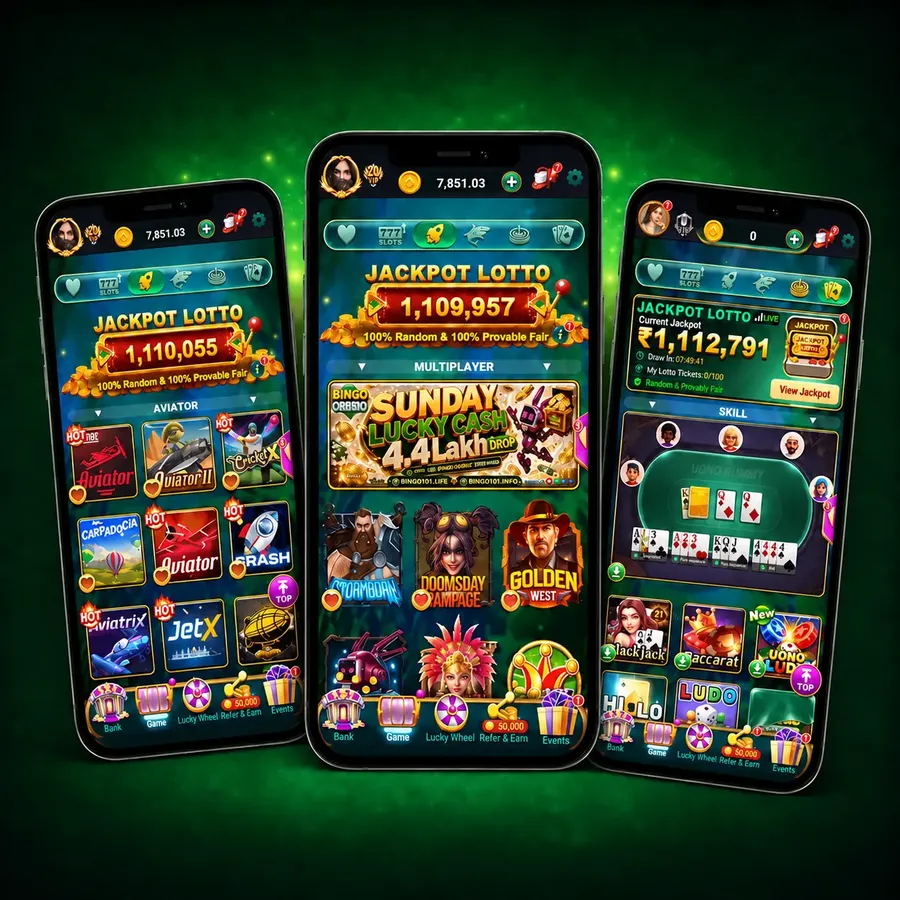
For a plain explanation of each format, read Bingo 101 games: how each category works. If you prefer to see individual titles, the all games catalogue lists them by category, and several games such as Rummy and Andar Bahar have their own rule guides.
Account Safety and Limits
The real risks around a popular app usually come from what circulates around it, not from the app itself. Four habits cover most of them:
- One source for the file. A repackaged APK can look identical. If you are unsure about the copy on your phone, the guide Is Bingo 101 real or fake? lists the checks.
- Never share your OTP or password, including with people who claim to be support. Nobody legitimate needs it.
- Ignore paid unblock or recharge offers made outside the app. Anyone asking for a fee to open or top up your account is running a scam.
- Skip predictor and hack tools sold for games like Aviator and Mines. Results are settled on the server, so no tool can know them in advance.
Limits matter as much as security. Bingo, slots and the instant games are games of chance, and no strategy or streak changes the odds of the next round. Set a spending and time limit before each session, do not chase losses, and stop if you notice you are playing with money meant for something else. The responsible gaming page explains the tools available, and the account security guide covers passwords and OTP safety in more detail.
When you need help with a payment or your account, open Contact Us in the app. Online customer service runs 24/7, and including the transaction ID, your UID and a screenshot gets the issue traced faster.
Frequently Asked Questions
What should I check before getting started with Bingo 101?
Confirm you are 18 or over, that your phone runs Android 5.0 or later, and that you are installing the genuine APK from the official source. Read the KYC and withdrawal terms and set a budget before using games that involve money.
Do I need an email address to register?
No. Registration uses your mobile number and an OTP sent by SMS. Use a number you will keep, because every later sign-in depends on it.
Where can I learn about the games?
The games guide explains each category, and the all games catalogue lists individual titles. Some popular games, such as Rummy and Andar Bahar, have their own rule guides.
What is the minimum add cash on Bingo 101?
The minimum add cash is ₹30, and the first add cash pays a 10% bonus up to ₹10,000. Always add money through the Add Cash button inside the app.
Is there an iPhone version of Bingo 101?
No. Bingo 101 is Android only at the time of writing and needs Android 5.0 or later.
Related Guides
- Bingo 101 APK Download for AndroidBingo 101 APK download
- Bingo 101 Login and Account AccessBingo 101 Login and OTP Help
- Bingo 101 Games: How Each Category WorksHow Each Game Category Works
- Bingo 101 Add Cash and Deposit HelpAdd cash and deposit help
- Bingo 101 KYC Verification and Account DetailsBingo 101 KYC Verification